Saturday, October 31, 2020

Favorite Windows Screenshot Tool

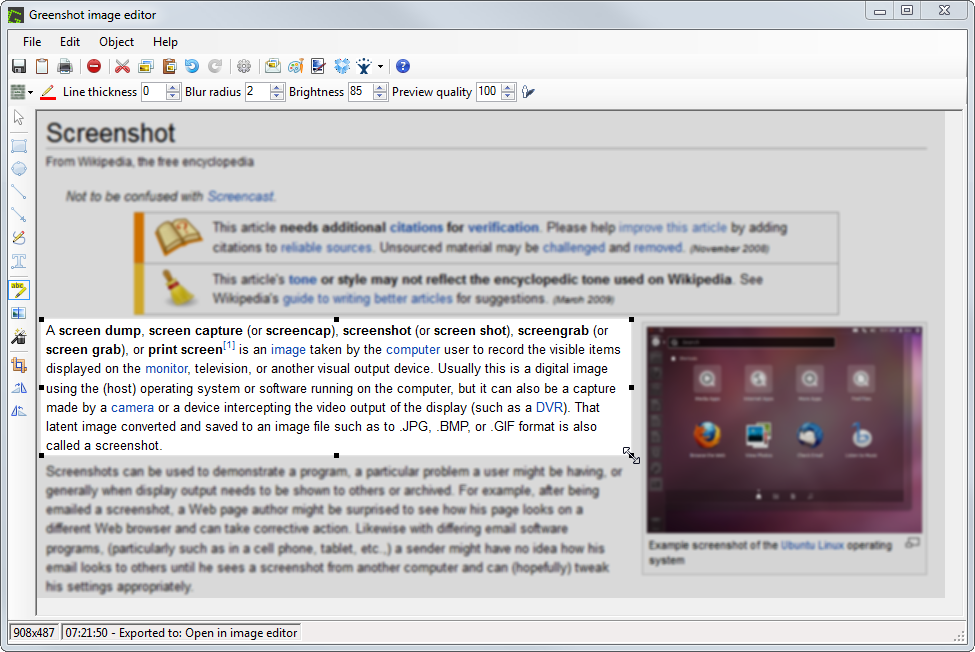
When on Windows, for taking and making screenshots for technical documentation, I love Greenshot.

https://getgreenshot.org/


Here's an image from their website, showing the UI of the application.


Friday, October 30, 2020

Removing orphans from MSX

From time to time, I try to script a job in MSX. Very often, it fails. 

When it does, I use this query to take a look at the orphans, and then I use the "delete" section to remove the orphan rows from MSX, which allows me to script the job.

This is based on code I found online, but I have lost the source.


select j.[name], *--count(*) 

--delete from js 

FROM msdb.dbo.sysjobservers js

INNER JOIN msdb.dbo.sysjobs j ON j.job_id = js.job_id

LEFT JOIN msdb.dbo.systargetservers ts ON ts.server_id = js.server_id

WHERE ts.server_id IS NULL

Thursday, October 29, 2020

IT is the new Halloween

We have USERS who create things that get KILLED using COMMANDS that are EXECUTED. Within the office, we speak of MASTERS and SLAVES, and of the dark magic that is BINDINGS. In our transportation, we are rich with DRIVERS and CONTAINERS.


Tuesday, October 9, 2018

Azure Data Studio

From the Azure Data Studio page:

What is Azure Data Studio?
Azure Data Studio is a cross-platform database tool for data professionals using the Microsoft family of on-premises and cloud data platforms on Windows, MacOS, and Linux.

Previously released under the preview name SQL Operations Studio, Azure Data Studio offers a modern editor experience with Intellisense, code snippets, source control integration, and an integrated terminal. It is engineered with the data platform user in mind, with built in charting of query result sets and customizable dashboards.

Downloads page is here:

https://docs.microsoft.com/en-us/sql/azure-data-studio/download?view=sql-server-2017


I am super excited about this development, as it finally gives me the ability to do something SSMS-like inside of my linux boxes!


Tuesday, October 2, 2018

VS30063: You are not authorized to access

So. I've just installed Visual Studio 2015 Update 3 (VS2015.3) and I'm getting this in the output window at startup:

We were unable to automatically populate your Visual Studio Team Services accounts. The following error was encountered:
VS30063: You are not authorized to access https://app.vssps.visualstudio.com.


What I had to was re-login.

In the top right corner of Visual Studio, I found a yellow warning triangle next to the place for my name. I clicked the down arrow and then the "Relogin" message.

After I restarted Visual Studio and signed back in, the error was gone.


Tuesday, September 25, 2018

Could not load file or assembly 'Microsoft.CodeAnalysis, version= 1.3.1.0, Culture=neutral, PublicKeyToken=31bf3856ad364e35' or one of its dependencies

I can't get the light bulb in Visual Studio 2015, and when I go to the context menu, I now get an error message:

Could not load file or assembly 'Microsoft.CodeAnalysis, version= 1.3.1.0, Culture=neutral, PublicKeyToken=31bf3856ad364e35' or one of its dependencies. The system cannot find the file specified.


So, for me, the answer was to install Visual Studio Update 3, found in Visual Studio under
Tools >> Extensions and Updates...


Tuesday, September 4, 2018

How to get around tablet mode on Windows 10

Oh my gracious, how I (sometimes) loathe default settings.

In Windows 10, for example, the default to "prompt" for tablet mode, when I'm exclusively on a laptop, is infuriating.

Here's how I get around that!

Let's open the Start Menu, and click on the Settings app.

Now click System, then Tablet Mode.

So, the click path is

Start >> Settings >> System >> Tablet Mode

Set the options :

"When I sign in" to use desktop mode
"When this device automatically switches tablet mode on or off" to don't ask me and don't switch
"Hide app icons on the taskbar in tablet mode" to off
"Automatically hide the taskbar in tablet mode" to off

Lastly, restart either your PC, or at least the problematic app - for me, it was Remote Desktop - and try again.

That's it!